Edit mode — click any text to edit Ctrl+S to save file · E to exit
Kubernetes · Drupal
01
Stanford Web Camp 2026

Demystifying
Kubernetes

A gentle introduction for Drupal developers — Dockerfiles, local dev, and cloud deployment. No prior Kubernetes experience required.

Jordan Koplowicz

Agenda
02
What we'll cover

The Plan

  1. What is Kubernetes, and why should Drupal developers care?
  2. The Dockerfile — your options, anatomy, and key decisions
  3. Running Kubernetes locally — and what about DDEV & Lando?
  4. Deploying to the cloud — registry, cluster, manifests, TLS
  5. Persistent storage — PVCs, S3, and the files/ gotcha
  6. The database question — in-cluster vs. managed
  7. Bonus: open-source starter kit & real-world cost breakdown
Basics
03
The 30-second version

What Is Kubernetes?

  • A container orchestrator — it runs your Docker containers, decides where they live, and keeps them alive
  • Open source, originally from Google, now the industry standard
  • Scales automatically — more traffic? Kubernetes spins up more copies of your app
    • Horizontal vs. vertical scaling
  • Self-healing — crashed container? It restarts it without you lifting a finger
If Docker is like a shipping container, Kubernetes is the port authority managing thousands of them.
Motivation
04
Why should we care?

Kubernetes + Drupal

  • Consistency — the same container runs locally, in staging, and in production. No more "works on my machine"
  • Hosting flexibility — DigitalOcean, AWS, GCP, Azure — all speak Kubernetes. You're not locked in
  • Scalability — handle traffic spikes by scaling your Drupal pods horizontally
  • GitOps-ready — your entire infrastructure lives in code, next to your Drupal codebase
  • On-Prem — for when you're not allowed to use Pantheon, Acquia
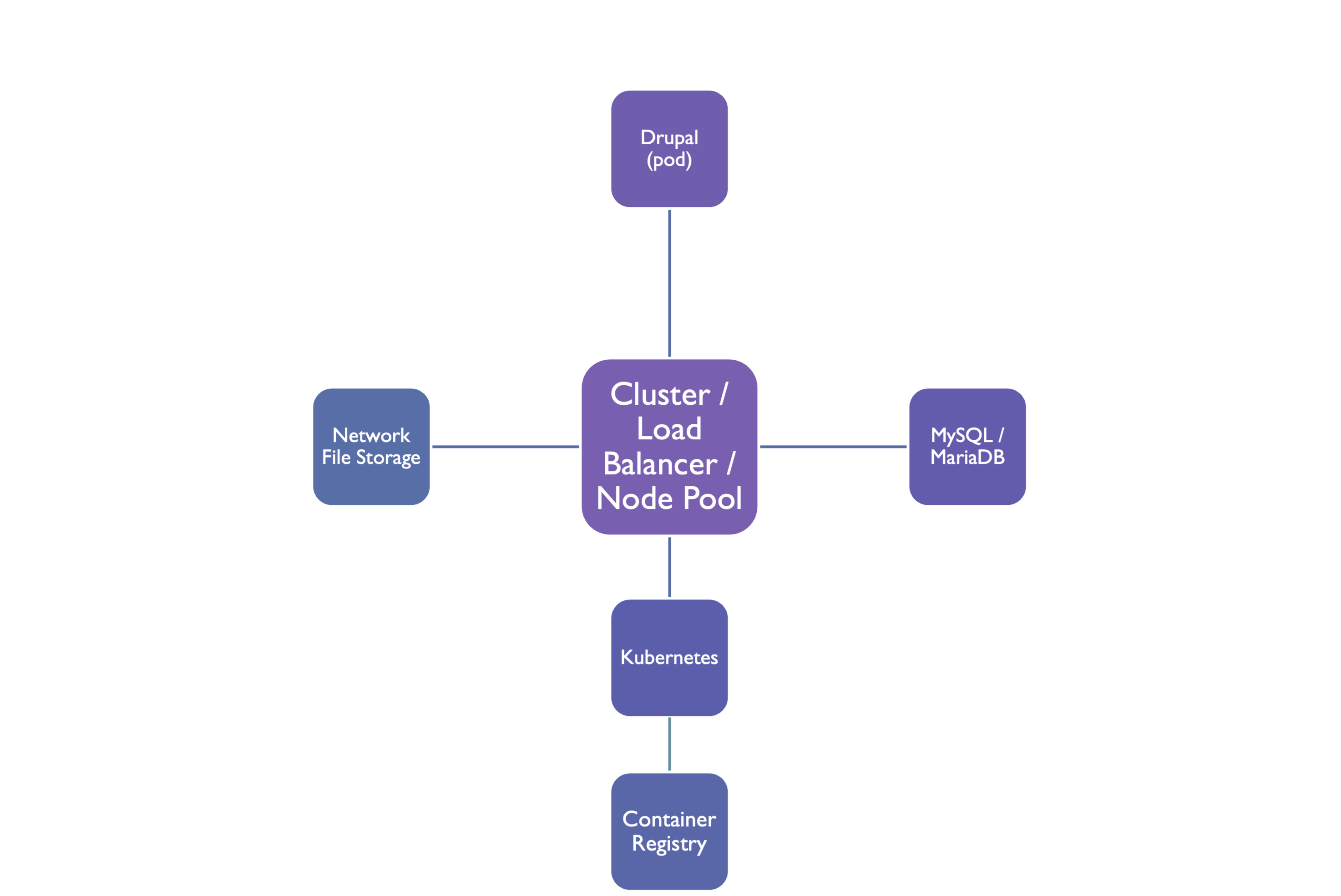
Diagram
diagram
Dockerfile
05
Special attention

The Dockerfile —
Your Options

Use an existing one
  • Official drupal image on Docker Hub
  • Geerlingguy's Drupal for Kubernetes
  • Steep learning curve
Build your own
  • Full control over PHP extensions
  • Smaller, purpose-built image
  • Matches your exact Drupal setup

We'll focus on building your own — it's not as scary as it sounds.

Dockerfile
06
The key layers

Anatomy of a Drupal Dockerfile

FROM php:8.3-fpm-alpine RUN docker-php-ext-install pdo pdo_mysql opcache COPY --from=composer:latest /usr/bin/composer /usr/bin/composer COPY . /var/www/html WORKDIR /var/www/html EXPOSE 9000 ENTRYPOINT ["/usr/bin/supervisord", "-c", "/etc/supervisor/conf.d/app.conf"]
Dockerfile
07
Build your own

Key Decisions to Make

  • Base imagephp:8.3-fpm-alpine is small and fast; -bookworm has more system libs available
  • PHP extensions — Drupal needs pdo_mysql, gd, opcache, apcu; add more for your modules
  • Nginx vs Apache — run as a sidecar container, or bake Nginx in with a custom entrypoint
  • Build vs runtime — run Composer during build?
  • Non-root user — always run the app as a non-root user in production
Local Dev
08
Running locally

Kubernetes on
Your Laptop

Local cluster options
  • Docker Desktop — one-click enable, great for getting started
  • Lima + Colima — Smaller client + command wrapper, more stable
  • minikube — classic, full-featured, runs a VM
  • kind — Kubernetes in Docker, no VM needed
  • k3d — lightweight k3s in Docker, very fast
The basic workflow
  • Build your image: docker build
  • Load it into the cluster: docker push localhost:5000/myapp
  • Apply your manifests: kubectl apply -f
  • Port-forward to test: kubectl port-forward
Local Dev
09
A question I know you're asking

What About DDEV
& Lando?

  • DDEV and Lando are excellent — purpose-built for Drupal local dev, zero config friction
  • They are not competitors to Kubernetes — they run Docker under the hood anyway
  • Use DDEV/Lando for day-to-day development — Xdebug, `drush`, Mailhog — it all just works
  • Use Kubernetes for staging and production — or when you need to test your deployment config locally
Short answer: Yes, keep using DDEV. Kubernetes lives at the deployment layer, not the developer laptop layer.
Cloud
10
Going live

Deploying to
the Cloud

  1. Push your image to a container registry (Docker Hub, DigitalOcean, GitHub Packages)
  2. Provision a cluster — DigitalOcean DOKS, AWS EKS, or GKE — all are Kubernetes under the hood
  3. Write a Deployment manifest — tells Kubernetes which image to run, how many replicas, resource limits
  4. Expose it with a Service + Ingress — route external traffic to your pods, add TLS via cert-manager
  5. Apply with kubectlkubectl apply -f k8s/ and you're live
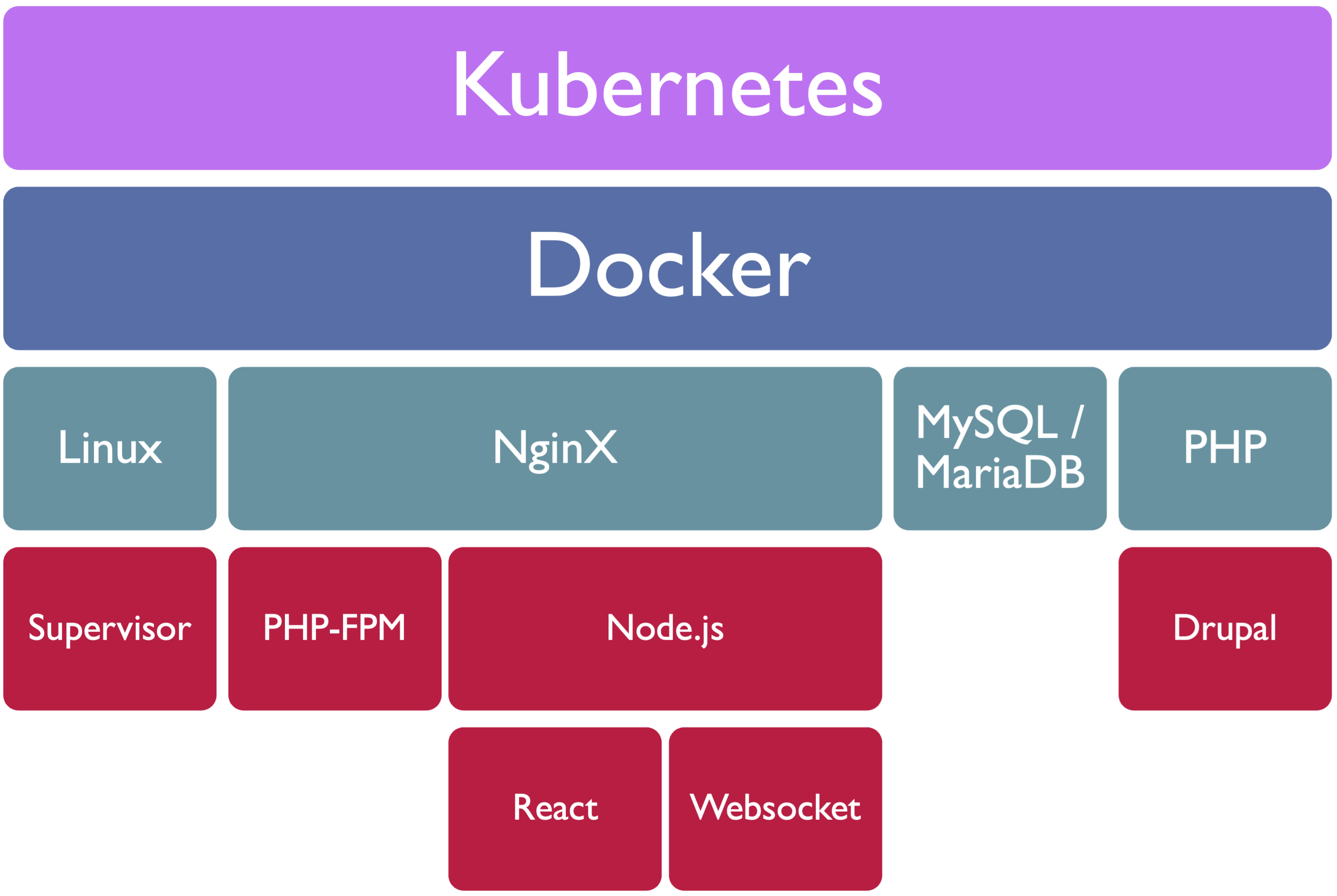
Network
network diagram
Storage
11
A common gotcha

Persistent Storage

  • Containers are ephemeral — when a pod restarts, the filesystem resets. Your files/ directory disappears
  • PersistentVolumeClaims (PVCs) — attach a persistent disk to your pod. Survives restarts
  • ReadWriteMany is tricky — multiple pod replicas all need to read/write the same files directory
  • Better approach: object storage — use S3 or DigitalOcean Spaces + the Drupal S3FS module. No shared filesystem needed
The s3fs Drupal module lets you point public:// at an S3-compatible bucket — no PVC headaches, scales infinitely.
Database
12
What about MySQL?

The Database Question

In-cluster DB
  • Run MySQL/MariaDB as a pod
  • Fine for dev/staging
  • You manage backups, failover, upgrades
  • Use a PVC for data persistence
Managed DB (recommended)
  • DigitalOcean Managed MySQL, RDS, Cloud SQL
  • Automatic backups & failover
  • Lives outside the cluster — survives cluster rebuilds
  • Just point Drupal's settings.php at it
Bonus
13
Take-home gift

Open Source
Drupal K8s Starter

I've open-sourced the Dockerfile and Kubernetes manifests I use in production. Everything we've talked about today — in one repo, ready to clone.
# Clone the starter kit git clone https://github.com/koppieesq/rail-baron # What's inside: # Dockerfile — PHP-FPM + Nginx, production-ready # k8s/ — Deployment, Service, Ingress manifests # k8s/secret.example.yaml — Template for DB credentials # README.md — Step-by-step setup guide
Free GPL License Drupal 11
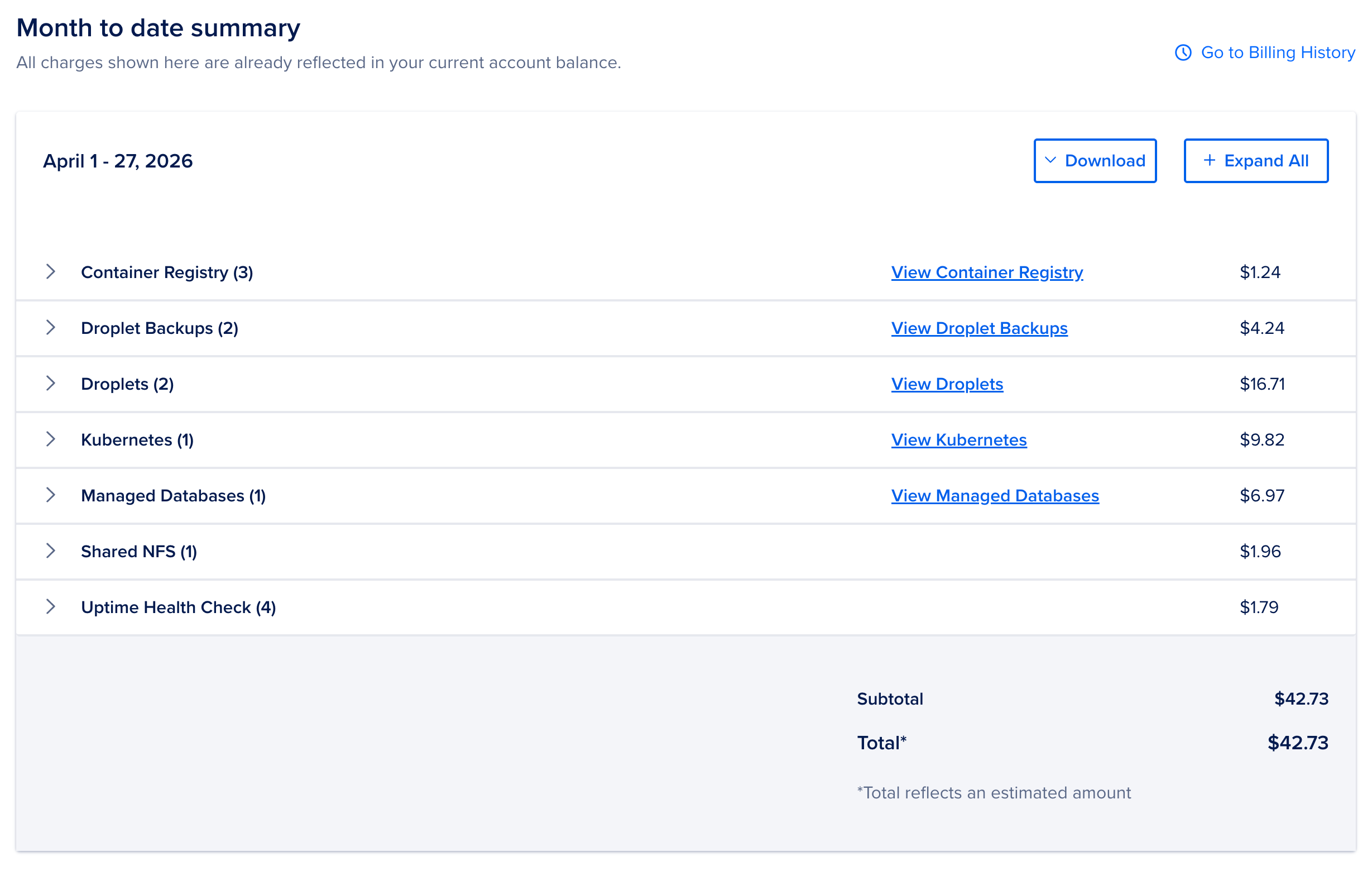
Costs
diagram
Demo
14
Live Demo Time
Live demos always work
Exit
15
That's a wrap
Thank
you.

Questions? I'll be around after the session — find me, or reach out online.

  • Slides & starter kit — github.com/koppieesq/rail-baron
  • Drupal.org — drupal.org/u/koppie
  • We're hiring! - https://www.tesla.com/careers/search/job/product-manager-vehicle-service-268625